

Free Download Portable MassTube Plus 21.5.1.191 Ultra Multilingual is a small, straightforward application designed to help users download videos from YouTube and other video-sharing sites quickly and easily without installation. It is a portable version, meaning you can run it directly from a USB drive or folder without going through a full setup process, which makes it convenient for use on multiple computers or when you don’t want to install software on a system.
Portable MassTube Plus 21 Description
At its core, MassTube Plus Portable focuses on simplicity and speed. To download a video, you just paste the video’s URL into the program’s main window, choose the quality and format you want, and start the download. It supports a wide range of video qualities — from basic SD up to Full HD and even 4K/8K if the source video offers it. It also handles a variety of output formats like MP4, FLV, WebM, and 3GP.
One of the notable features for a portable tool is the download history manager. This lets you view and manage previously downloaded videos — making it easier to track what you’ve saved, re-download if needed, or organize your library. Some versions also include the ability to extract audio from videos and save it directly as MP3 or other audio formats, which can be useful if you want just the soundtrack.
MassTube Plus Portable is designed to be lightweight and resource-efficient, so it doesn’t burden your system while running. Because it doesn’t need installation, it’s ideal for users who want a quick, portable solution to download content for offline viewing. While its interface is simple and not flashy, it gets the job done effectively for basic video and audio downloading needs.
Portable MassTube Plus 21 is a lightweight, portable video-downloading application designed to make saving online videos (especially from YouTube) fast and easy without needing to install the program on your Windows PC.
Screenshots Of Portable MassTube Plus 21.5.1.191 Ultra Multilingual
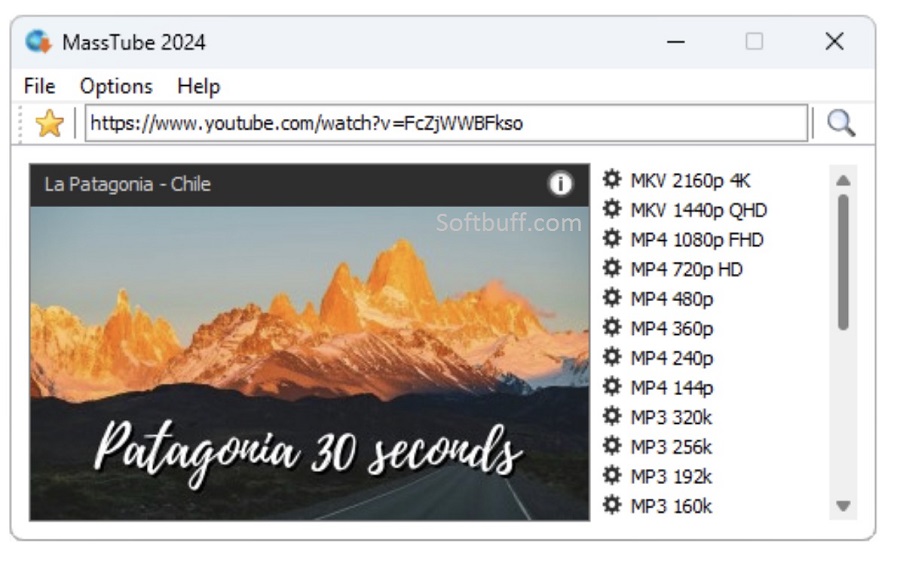
Features Of MassTube Plus 21
- Download videos from YouTube and supported sites — paste a video link to start grabbing content quickly.
- Supports high resolutions — from basic SD up to Full HD (1080p), Ultra HD (4K) and sometimes 8K if available.
- Multiple format support — save videos in formats like MP4, FLV, WebM, 3GP, and more depending on version.
- Built-in conversion options — convert downloaded videos to different formats without separate software.
- Audio extraction — choose to save just the audio track (e.g., MP3, OGG, FLAC) from a video.
- History manager — keeps a list of previously downloaded videos. You can view, clear, export, or import your download history.
- Output customization — set default download folder and file naming rules.
Some Details of Portable MassTube Plus 21.5.1.191 Ultra Multilingual
| NAMES | DETAILS |
|---|---|
| Software Name | Portable MassTube Plus 21.5.1.191 Ultra Multilingual |
| Setup File Name | Portable MassTube Plus 21.5.1.191 Ultra Multilingual.exe |
| File Size | 4.8 MB |
| Release Added On | Monday, Feb/23/2026 |
| Setup Type | Offline Installer |
| Developer/Published By | MassTube |
| Shared By | SoftBuff |
System Requirements for Portable MassTube Plus 21
| NAME | RECOMMENDED |
|---|---|
| Operating System: | Windows XP/Vista/7/8/8.1/10 |
| Memory (RAM) | 2 GB |
| Hard Disk Space | 1 GB |
| Processor | Intel Pentium 4 Dual Core GHz or higher |
| Machine | PC/Computer, Laptop/Desktop |
How to Install
| INSTALLATION INSTRUCTION |
|---|
| 1): Extract Portable MassTube Plus 21 (EXE) files using WinRAR or WinZip or by default Windows. |
| 2): Open Installer and accept the terms and then install the MassTube Plus 21 for Windows version program on your Device. |
| 3): Now enjoy installing this program (MassTube Portable). |
Password for file: 123