

Free Download AnyUnlock – All in One iPhone Unlocker for Windows 11, 10, 8.1 and 7 is a powerful and easy-to-use iPhone unlocking tool designed for Windows users who need a reliable solution to regain access to their Apple devices. Developed by iMobie, AnyUnlock is an all-in-one utility that helps users unlock various types of iPhone, iPad, and iPod touch locks without requiring advanced technical skills. Whether you forgot your passcode, purchased a second-hand iPhone locked to an old Apple ID, or are stuck with Screen Time restrictions, AnyUnlock offers a practical solution.
AnyUnlock – All in One iPhone Unlocker for Windows Description
One of the main strengths of AnyUnlock is its wide range of unlocking features. It can remove screen passcodes, including 4-digit, 6-digit, Touch ID, and Face ID locks. If your iPhone is disabled due to multiple incorrect attempts, AnyUnlock can help you regain access quickly. The software also supports unlocking Apple ID from activated devices, which is especially useful if you no longer remember the original Apple ID or password associated with the device.
AnyUnlock also provides tools to bypass or remove Screen Time passcodes without data loss in many cases. This feature is helpful for parents or users who have forgotten their Screen Time password and cannot change restrictions or access certain apps. Additionally, it allows users to view and export Screen Time passcodes under specific conditions, making it a versatile parental-control recovery tool.
Another key feature is SIM unlocking support. AnyUnlock can help remove SIM locks, allowing users to use their iPhones with different carriers. This is particularly beneficial for people who travel frequently or have purchased carrier-locked devices. The software also includes MDM (Mobile Device Management) bypass functionality, enabling users to remove MDM profiles from supervised devices, which is useful for devices previously managed by organizations or schools.
The interface of AnyUnlock is clean, modern, and beginner-friendly. All features are clearly categorized, and the step-by-step instructions make the unlocking process straightforward. Even users with little technical knowledge can follow the guided process easily. The software is compatible with a wide range of iOS versions and supports most modern iPhone and iPad models.
Security and privacy are also considered in AnyUnlock’s design. The tool focuses on unlocking device access rather than collecting personal data, and iMobie is a well-known developer with a good reputation in the iOS utility market. However, users should always back up their data when possible, as some unlocking processes may require device resets depending on the situation.
In conclusion, AnyUnlock – All-in-One iPhone Unlocker for Windows is a comprehensive solution for users facing iOS lock issues. With support for screen locks, Apple ID removal, Screen Time recovery, SIM unlocking, and MDM bypass, it covers almost every common iPhone unlocking scenario. Its simple interface, powerful features, and broad compatibility make it a valuable tool for both individual users and technicians who work with iOS devices regularly.
Screenshot Of AnyUnlock – All in One iPhone Unlocker for Windows 11, 10, 8.1 and 7
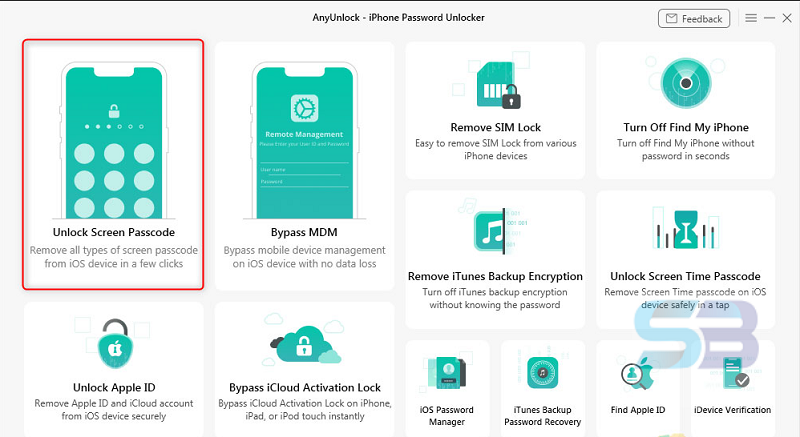
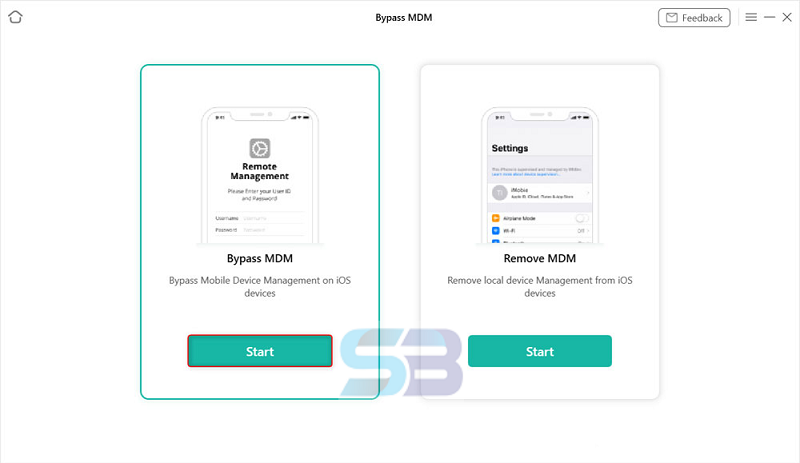
Features Of AnyUnlock – All in One iPhone Unlocker for Windows
🔓 1. iPhone/iPad Screen Unlock
Unlock any type of screen lock including:
-
4-digit & 6-digit passcodes
-
Touch ID
-
Face ID
-
Custom numeric or alphanumeric codes
Even if your device is disabled due to too many wrong attempts.
🍏 2. Apple ID Removal
Remove an Apple ID from your device without needing the password.
Once removed, you can:
-
Sign in with a new Apple ID
-
Use iCloud, App Store, and other services normally (depending on conditions)
⏱️ 3. Screen Time Passcode Removal
Recover or remove the Screen Time (Restrictions) passcode without losing data in many situations.
Useful if you:
-
Forgot your Screen Time passcode
-
Can’t change restrictions on the device
📶 4. SIM Unlock
Unlock your iPhone from carrier restrictions so you can use SIM cards from any network (carrier unlocking).
Good for:
-
Traveling internationally
-
Switching network providers
5. MDM Bypass (Mobile Device Management)
Remove or bypass MDM profiles on supervised iPhones or iPads, especially if the device was previously managed by:
-
Schools
-
Companies
-
Organizations
🔐 6. Lock Screen Passcode Removal
If you’re stuck at the lock screen due to forgotten codes, AnyUnlock can help bypass it safely.
🔍 7. View & Export Screen Time Passcodes
In supported cases, you can view existing Screen Time passcodes and export them for reference.
🔄 8. Support for Many iOS Versions
Works with a wide range of iPhone, iPad, and iPod touch devices and supports most recent iOS versions.
9. Simple & User-Friendly Interface
-
Clear menus
-
Step-by-step guidance
-
Easy for beginners
No technical expertise needed to operate.
Some Details of AnyUnlock iPhone Screen Unlocker
| NAMES | DETAILS |
|---|---|
| Software Name | AnyUnlock iPhone Screen Unlocker |
| Setup File Name | AnyUnlock-iPhone-Screen-Unlocker.exe |
| File Size | 14.24 MB |
| Release Added On | Thursday, Jan/15/2026 |
| Setup Type | Offline Installer |
| Developer/Published By | AnyUnlock |
| Shared By | SoftBuff |
System Requirements for Download AnyUnlock iPhone Screen Unlocker
| NAME | RECOMMENDED |
|---|---|
| Operating System: | Windows XP/Vista/7/8/8.1/10 |
| Memory (RAM) | 1 GB |
| Hard Disk Space | 100 MB |
| Processor | Intel Pentium 4 Dual Core GHz or higher |
| Machine | PC/Computer, Laptop/Desktop |
How to Install AnyUnlock iPhone Screen Unlocker
| INSTALLATION INSTRUCTION |
|---|
| 1): Extract Any unlock app setup (EXE) file using WinRAR or WinZip or by default Windows. |
| 2): Open Installer and accept the terms and then install the Any unlock app Windows version program on your Mac. |
| 3): Now enjoy installing from this program (Any unlock app). You can also download |