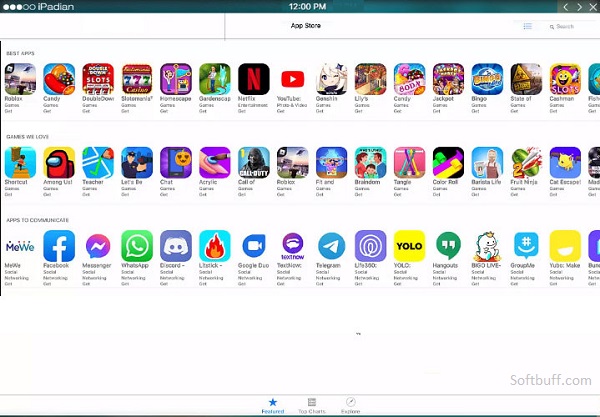
Free Download iPadian Emulator Offline Installer is a popular iOS simulator designed mainly for Windows and macOS users who want to experience the look and feel of Apple’s iOS environment without owning an actual iPhone or iPad. It does not fully emulate iOS hardware like advanced emulators; instead, it provides a simulated interface that closely resembles iOS, making it useful for casual use, demonstrations, and basic app exploration.
iPadian Emulator Description
One of the main highlights of iPadian is its clean and user-friendly interface. After installation, users are welcomed with an iOS-style home screen, complete with app icons and smooth navigation. It comes with several pre-installed apps, such as Facebook, TikTok, WhatsApp, YouTube, Spotify, and Instagram, which run within the iPadian environment. These apps are optimized to work directly inside the emulator, giving users a familiar iOS-like experience.
iPadian is often used by developers and designers who want a simple way to preview app layouts or demonstrate iOS-style UI concepts. It can also be helpful for content creators who want to record iOS-looking screens for tutorials or presentations. However, it’s important to note that iPadian does not support the official Apple App Store and cannot run real IPA files. This means you cannot install every iOS app or game like PUBG or Call of Duty Mobile.
In terms of performance, iPadian is lightweight and runs smoothly on most modern PCs. It does not require virtualization or heavy system resources, making it suitable for low- to mid-range computers. The emulator is available in both free and paid versions, with the paid version offering better performance, fewer ads, and additional features.
Overall, iPadian Emulator is best for users who want a visual iOS experience rather than a true iOS emulator. It’s ideal for learning, UI testing, and casual exploration—but not for high-end gaming or full iOS app development.
iPadian Emulator is a well-known iOS simulator developed for Windows and macOS users who want to experience an iOS-style environment without owning an iPhone or iPad. Unlike full iOS emulators that attempt to replicate Apple hardware and system behavior, iPadian works as a simulator, focusing mainly on the user interface and overall iOS look. This makes it easier to use and less demanding on system resources.
One of the biggest advantages of iPadian is its simple installation and clean design. After setup, users are greeted with a familiar iOS-like home screen featuring app icons, smooth animations, and touch-style navigation. The interface is designed to feel intuitive, even for users who have never used an iOS device before. iPadian includes several built-in apps, such as YouTube, Facebook, TikTok, WhatsApp, Instagram, Spotify, and a web browser, allowing users to explore popular services within the emulator.
iPadian is commonly used by students, designers, and content creators. Designers can preview how apps or layouts might look in an iOS environment, while content creators can record videos or screenshots that resemble iOS screens for tutorials or demonstrations. It is also useful for beginners who want to understand the iOS ecosystem before switching to an Apple device.
However, iPadian has some important limitations. It does not support the official Apple App Store and cannot run real iOS IPA files. This means advanced apps and high-end games such as PUBG Mobile or Call of Duty Mobile are not supported. Because of this, iPadian is not suitable for professional iOS app development or serious mobile gaming.
From a performance perspective, iPadian is lightweight and stable. It runs smoothly on most low- to mid-range computers and does not require virtualization technology. The emulator is available in both free and paid versions. The free version includes ads and limited features, while the paid version offers improved performance, fewer advertisements, and extra tools.
In conclusion, iPadian Emulator is ideal for users seeking a basic iOS-style experience on a PC. While it cannot replace a real iPhone or a true iOS emulator, it remains a practical choice for UI previews, learning, and casual use.