

AnarVPN Free Download for Windows 11/10/8/7 (2027) – Secure, Fast & Private VPN has Browse privately, protect your internet connection, block unwanted ads, and connect through VPN servers with AnarVPN.
Introduction to AnarVPN
AnarVPN is a mobile VPN application designed to make everyday internet browsing more private, convenient, and flexible. It provides users with a straightforward way to connect to a VPN server, select a preferred country, and route supported internet traffic through an encrypted connection. Instead of requiring complicated network configurations, the application focuses on simple controls that make VPN connections accessible to ordinary smartphone users.
Whether you regularly browse websites, use social media, access online services, or connect to public Wi-Fi networks, a VPN can provide an additional layer of connection protection. AnarVPN combines several useful tools in one application, including one-tap connection, server selection, ad blocking, custom DNS, split tunnelling, and a kill switch.
One of its main advantages is its relatively simple interface. Users can connect to a server without manually configuring complicated network settings. They can also browse available server countries, search for locations, save favourite servers, and check ping information before connecting.
AnarVPN also includes an ad-blocking option that can stop supported advertising and tracker domains before they load. This may help reduce unwanted advertisements and interruptions while browsing compatible websites.
The application offers free and Premium access options. The free version may display advertisements, while Premium access can provide an ad-free experience. Availability and promotional access may vary.
What Is AnarVPN?
AnarVPN is a VPN application developed for Android devices. Its purpose is to provide a convenient connection between your device and a selected VPN server.
When a VPN connection is active, supported internet traffic travels through an encrypted tunnel between your device and the VPN server. This helps protect traffic from being easily read by other people sharing the same local network.
For example, when you connect to public Wi-Fi in a hotel, airport, café, or other shared location, using a VPN can help reduce the risk of local network interception. It is also useful for people who want to route their internet connection through another available server location.
AnarVPN offers both automatic connection and manual server selection. Users who do not want to spend time choosing a location can use the available connection option, while those who prefer more control can browse the server list.
However, a VPN should not be considered a complete anonymity solution. Your online safety also depends on the websites you visit, account security, device protection, and the privacy practices of the VPN provider.
Main Features of AnarVPN
1. One-Tap VPN Connection
One of the most convenient features of AnarVPN is its one-tap connection system. Users can start a VPN session without going through a complicated configuration process.
This makes the application suitable for beginners who want a straightforward VPN experience. Once connected, the application manages the VPN tunnel until the user disconnects or the connection changes.
2. Multiple Server Locations
AnarVPN allows users to browse available VPN server locations by country. Instead of relying on a single connection location, users can explore the available options and select a server according to their needs.
The application also provides server search and favourite options, making it easier to find frequently used locations.
3. Automatic Server Selection
Not everyone knows which VPN server to choose. AnarVPN provides an option to let the application select a suitable server automatically.
This is useful when you simply want to establish a connection without manually comparing locations.
4. Built-In Ad Blocking
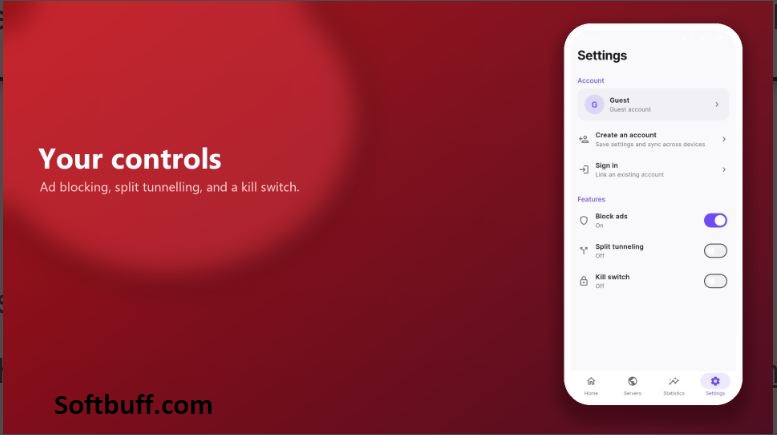
AnarVPN includes an ad-blocking feature that can be enabled through its settings.
The feature works by blocking supported advertising and tracker domains before they load. This may reduce certain unwanted advertisements and help pages load with fewer interruptions.
Ad blocking does not guarantee that every advertisement will disappear. Some advertisements are delivered through domains that are also used for normal website content.
5. Server Ping Information
Choosing a VPN server with a suitable response time can improve your browsing experience.
AnarVPN provides ping information for available servers, helping users compare connection responsiveness before selecting a location.
Lower ping values generally indicate a faster response time, although actual download and upload speeds also depend on server capacity, network conditions, and distance.
6. Split Tunnelling
Split tunnelling allows users to decide which applications should use the VPN connection.
For example, you may want your browser and selected applications to use the VPN while other applications continue using your normal internet connection.
This feature provides additional flexibility for people who do not want every application to use the same network route.
7. Custom DNS Settings
AnarVPN includes custom DNS configuration options.
DNS helps translate website names into the addresses required for network connections. Users who understand DNS settings can configure their preferred DNS option instead of relying entirely on automatic settings.
For beginners, the automatic configuration is generally the simpler choice.
8. Kill Switch Protection
A VPN connection can occasionally become interrupted because of network problems or server changes.
AnarVPN includes a kill switch feature intended to help protect traffic if the VPN tunnel drops. Its purpose is to prevent normal internet traffic from continuing outside the protected connection during a disconnection.
Users should check that the feature is enabled and working correctly rather than assuming protection is active automatically.
9. Guest Access and Account Options
AnarVPN provides different ways to access the application. Users can continue as guests or sign in using supported email or Google account options.
Guest access is convenient for people who want to explore the application without immediately creating an account.
10. Free and Premium Options
AnarVPN offers free and Premium access.
The free version may display advertisements, while a promotional code can unlock Premium access and remove advertisements according to the application’s listing.
Users should review the available subscription or promotional terms before purchasing or activating an offer.
How AnarVPN Works
A VPN creates an encrypted connection between your device and a remote VPN server. When you browse the internet with the VPN connected, supported traffic travels through this connection before reaching its destination.
This can help protect your traffic against observation by other users on the same local Wi-Fi network. Websites and online services will generally see the VPN server’s public IP address rather than your normal public IP address.
AnarVPN makes this process easier by providing a mobile interface for selecting servers and managing the connection.
The basic process is straightforward:
- Install AnarVPN on your Android device.
- Open the application.
- Select an available country or automatic server option.
- Tap the connection button.
- Approve the Android VPN permission request.
- Wait for the connection to become active.
- Browse the internet while the VPN remains connected.
Remember that a VPN does not protect you against every online threat. It does not automatically prevent phishing, malicious downloads, account theft, or tracking through cookies and logged-in accounts.
System Requirements
Before downloading AnarVPN APK, check that your Android device meets the application’s actual compatibility requirements.
- Application Name: AnarVPN
- Version: 1.0.0 (check the APK listing for the latest build)
- Platform: Android
- Operating System: Compatible Android version required
- Architecture: Depends on the available APK package
- RAM: Sufficient free memory for normal Android applications
- Storage: Free space for downloading and installing the application
- Internet Connection: Required
- Network Permissions: Required for VPN connectivity
- Account: Guest access or supported sign-in options
- Connection: Wi-Fi or mobile data
- License: Free with Premium options
Compatibility note: The exact minimum Android version, APK architecture, and storage requirements should be confirmed against the original installation package. Do not publish unverified Android version numbers as official requirements.
AnarVPN is listed as an Android application. A native Windows desktop version has not been verified, so Windows 11, Windows 10, Windows 8, and Windows 7 should not be advertised as supported platforms without official confirmation.
How to Download and Install AnarVPN APK
Installing AnarVPN on an Android smartphone is relatively simple. Follow these steps to complete the process.
Step 1: Download AnarVPN APK
Download the AnarVPN APK from Google Play or another trustworthy source that provides the original application package.
Before downloading, check the application name, version number, developer information, and package details. Avoid modified packages from unknown websites.
Step 2: Locate the Downloaded APK
After downloading the APK file, open your device’s Downloads folder.
Find the AnarVPN installation package and tap it to begin installation.
Step 3: Allow Installation When Necessary
If Android displays a security message about installing applications from unknown sources, open the relevant settings and allow installation for the browser or file manager you are using.
Only grant this permission when you trust the source of the APK. You can disable it again after installation.
Step 4: Install the Application
Tap the Install option and wait for Android to complete the installation process.
The installation time may vary depending on your smartphone, available storage, and device performance.
Step 5: Open AnarVPN
After installation, tap Open or find the AnarVPN icon in your application menu.
Launch the application and review its initial settings.
Step 6: Choose a VPN Server
Browse the available country locations or use the automatic server selection option.
If you frequently use a particular server, you can save it to your favourites for easier access.
Step 7: Connect to the VPN
Tap the main connection button. Android may ask you to approve a VPN connection request.
Review the permission and approve it if you want to establish the VPN connection.
Step 8: Configure Additional Features
Once connected, you can explore the available settings, including:
- Ad blocking
- Split tunnelling
- Custom DNS
- Kill switch
- Server favourites
Configure only the features you need. If you are new to VPN applications, starting with the default settings is a sensible approach.
Advantages of Using AnarVPN
AnarVPN includes several features that can make everyday VPN usage more convenient.
Its one-tap connection option reduces the effort required to establish a VPN connection. Users can also select different server countries instead of depending on a single location.
The built-in ad-blocking option is another useful addition, particularly for people who want to reduce supported advertising and tracking domains.
Split tunnelling provides more control over application traffic, while custom DNS settings are helpful for users who prefer managing their own DNS configuration.
The guest access option can also make it easier to try the application without immediately creating an account.
Overall, AnarVPN brings several practical VPN management tools together in a single Android application.
Limitations and Things to Consider
Although AnarVPN offers useful features, there are some limitations worth understanding before using it.
First, VPN performance depends on the quality of your internet connection and the availability of VPN servers. Connecting to a distant or heavily loaded server may result in slower browsing speeds or higher latency.
Second, the free version may display advertisements. Users who prefer an ad-free experience may need to explore the Premium option.
Third, a VPN does not make someone completely anonymous online. Websites may still identify users through accounts, browser cookies, and other tracking technologies.
Finally, users should understand the provider’s privacy policy. AnarVPN states that it does not record the websites or applications users visit, but its listing also explains that session information can include the selected server, connection time, data volume, and connecting IP address.
This distinction is important for anyone choosing a VPN primarily for privacy.
Pros and Cons of AnarVPN
Pros
- Simple and beginner-friendly interface.
- One-tap VPN connection.
- Automatic server selection option.
- Multiple server countries.
- Server search and favourite options.
- Built-in ad and tracker domain blocking.
- Split tunnelling support.
- Custom DNS configuration.
- Kill switch feature.
- Guest access option.
- Free and Premium access options.
Cons
- The free version may display advertisements.
- VPN speed depends on server load and internet quality.
- Not every advertising domain can be blocked.
- Some advanced settings may confuse beginners.
- Session metadata is still stored according to the provider’s description.
- A VPN does not guarantee complete online anonymity.
- Android compatibility requirements should be checked before installation.
- A native Windows desktop release has not been verified.
Privacy and Security Considerations
Privacy is one of the most important things to consider when choosing a VPN application.
AnarVPN states that it does not record the websites or applications users visit. However, its published information also explains that a session can store certain connection details, including the server used, session time, data volume, and the IP address from which the user connected.
This means that users should distinguish between browsing activity logs and connection-related information.
Before using any VPN service, read its privacy policy and understand what information may be processed or retained. Also, remember that the VPN provider becomes an important part of your internet connection path.
For better security, download the original application, keep it updated, use strong passwords for online accounts, and avoid sharing sensitive information with unknown websites.
Who Should Use AnarVPN?
AnarVPN may be useful for several types of Android users.
Everyday internet users: People who regularly browse websites and use mobile applications may appreciate its simple connection controls.
Public Wi-Fi users: People connecting through shared networks can use a VPN to add encryption to supported network traffic.
Privacy-conscious users: People looking for additional connection privacy may find the server selection and DNS features useful.
Users who dislike excessive advertisements: The built-in ad-blocking option may help reduce supported advertising and tracker domains.
Users who want more control: Split tunnelling and custom DNS settings provide additional configuration options for people who understand how these features work.
Final Verdict
AnarVPN is an Android VPN application that focuses on making private connections easier to manage. Its combination of one-tap connectivity, server selection, ad blocking, split tunnelling, custom DNS, and kill switch functionality provides a useful collection of tools for everyday mobile internet use.
The application is particularly interesting for users who prefer a simple interface but still want access to additional network configuration options.
However, users should not assume that a VPN guarantees complete anonymity or that all internet activity becomes invisible. Understanding the privacy policy, checking connection performance, and downloading the original application are important steps before using the service.
If you are looking for an Android VPN application with convenient connection controls and built-in ad-blocking functionality, AnarVPN is worth exploring.
Frequently Asked Questions (FAQ)
1. What is AnarVPN?
AnarVPN is an Android VPN application that helps users establish encrypted VPN connections and provides tools such as server selection, ad blocking, split tunnelling, and custom DNS.
2. Is AnarVPN free?
AnarVPN offers free access, although the free version may display advertisements. Premium access is also available.
3. Does AnarVPN support Android?
Yes. AnarVPN is listed on Google Play as an Android application.
4. Can I use AnarVPN on Windows 11?
A native Windows desktop version has not been verified. The Android application should not be advertised as a Windows program.
5. Does AnarVPN include an ad blocker?
Yes. Its settings include an option to block supported advertising and tracker domains.
6. Does AnarVPN support multiple server locations?
Yes. Users can browse server locations by country, search for servers, and save favourites.
7. What is split tunnelling in AnarVPN?
Split tunnelling lets users choose which applications should route their internet traffic through the VPN.
8. Does AnarVPN have a kill switch?
Yes. The application listing describes a kill switch intended to help protect traffic if the VPN tunnel drops.
9. Can I use AnarVPN without creating an account?
Yes. The application provides a guest access option, alongside supported sign-in methods.
10. Does AnarVPN guarantee complete anonymity?
No. A VPN can improve connection privacy, but it cannot guarantee complete anonymity or prevent every form of online tracking.
11. Does AnarVPN store user information?
Its published description says browsing activity is not recorded, but certain session details may be stored, including the server used, connection time, data volume, and connecting IP address.
12. Is AnarVPN safe to install?
Download the original application from Google Play or a trusted source. Review its permissions and privacy policy before using it.
13. Does AnarVPN require an internet connection?
Yes. An active Wi-Fi or mobile data connection is necessary to establish a VPN connection.
14. Can I choose a VPN server manually?
Yes. AnarVPN provides country selection, server search, favourites, and ping information.
15. What is the latest version of AnarVPN?
Check the application’s official Google Play listing or trusted release source for the latest available version. Version numbers may change as developers publish updates.