

Free Download MobiKin Assistant for iOS is a powerful and reliable desktop software designed to help iPhone, iPad, and iPod users manage, back up, and transfer their data with ease. Whether you want to organize files, create secure backups, or move data between your iOS device and computer, MobiKin Assistant for iOS provides a simple yet professional solution for everyday users and advanced professionals alike.
MobiKin Assistant for iOS Description
MobiKin Assistant for iOS is an all-in-one iOS management tool that works on Windows and macOS computers. It allows users to access iOS data directly from a computer without relying on iTunes. Unlike iTunes, which can be slow and limited, MobiKin Assistant offers more control, faster performance, and selective data management. With just a few clicks, you can view, export, import, delete, and back up your iPhone or iPad data safely.
MobiKin Assistant for iOS is not only useful for personal users but also highly beneficial for businesses, technicians, and mobile repair professionals. For example, phone repair shops can use this tool to back up customer data before repairs, reducing the risk of data loss and increasing customer trust. IT administrators can also manage multiple iOS devices efficiently, making it suitable for office and institutional environments.
Another major advantage is its support for printable data formats. Contacts, messages, and call logs can be exported in formats such as CSV, HTML, or XML. This is especially helpful for legal documentation, business records, or personal archiving. Users can easily read messages and contacts on a computer without needing the iPhone itself.
Performance and Reliability
MobiKin Assistant for iOS is optimized for fast scanning and transfer speeds. Even devices with large amounts of data can be processed smoothly without freezing or crashing. The software is lightweight and does not consume excessive system resources, which makes it ideal for older or low-spec computers as well.
Regular updates ensure compatibility with the latest iOS versions and new Apple devices. The development team also focuses on fixing bugs and improving performance, which adds to the long-term reliability of the software.
Trial Version and Licensing
MobiKin Assistant for iOS offers a free trial version that allows users to scan and preview data before purchasing. This helps users understand the software’s capabilities and decide whether it meets their needs. The full version unlocks unlimited data transfer, backup, and restore features at a reasonable cost compared to other premium iOS management tools.
Final Thoughts
In conclusion, MobiKin Assistant for iOS is a complete and dependable solution for iOS data management. It combines ease of use, strong security, and professional-level features into one package. Whether you want to back up important data, transfer files, manage storage, or maintain records, this tool provides a practical and efficient approach. For anyone seeking greater control over their iPhone or iPad data, MobiKin Assistant for iOS remains a smart and trusted choice.
Screenshots Of MobiKin Assistant for iOS
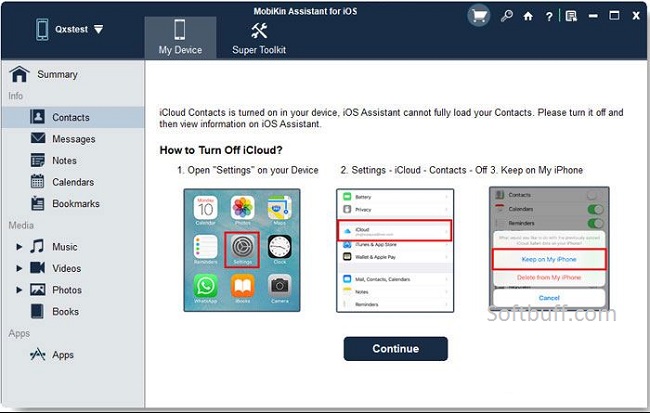
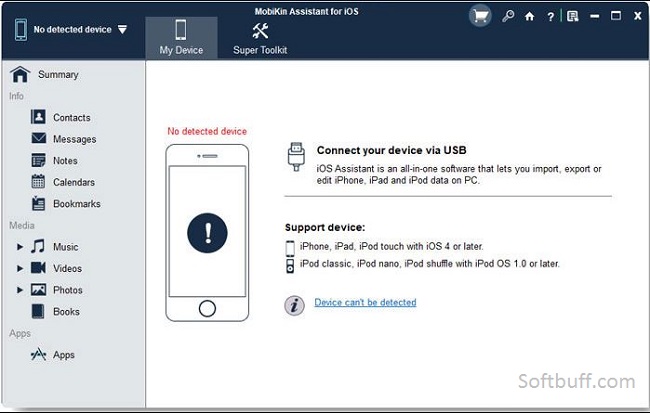
Features Of MobiKin Assistant for iOS
One of the biggest advantages of MobiKin Assistant for iOS is its wide range of features. It supports almost all types of iOS data, including contacts, messages, call logs, photos, videos, music, notes, calendars, bookmarks, and even apps:
- 1. One-Click Backup and Restore
MobiKin Assistant allows you to back up your entire iOS device to a computer with one click. You can also restore backups to your device anytime without data loss. This feature is especially useful before system updates, device resets, or switching to a new iPhone. - 2. Selective Data Transfer
Unlike traditional tools, MobiKin Assistant lets you preview and select specific files before transferring them. You can export contacts, SMS, photos, or videos individually, saving storage space and time. - 3. iTunes Alternative
For users who dislike iTunes, MobiKin Assistant is a perfect alternative. It works independently, does not overwrite existing data, and provides a cleaner and more user-friendly interface. - 4. Device Data Management
You can directly delete unwanted files such as old messages, duplicate contacts, or unused photos from your iOS device through your computer. This helps free up storage space and improve device performance. - 5. App and File Management
MobiKin Assistant also supports managing apps, documents, and media files. You can install or uninstall apps and manage files stored in supported applications. - Compatibility and System Requirements
- MobiKin Assistant for iOS supports almost all iOS devices, including the latest iPhone and iPad models. It is compatible with modern iOS versions and works smoothly on Windows 11, Windows 10, Windows 8, Windows 7, as well as macOS systems. The software requires iTunes drivers to recognize iOS devices, but iTunes itself does not need to be opened during use.
- User-Friendly Interface
- The software is designed with simplicity in mind. Even beginners can use MobiKin Assistant without technical knowledge. Once your device is connected via USB, the program automatically scans and categorizes your data. Everything is displayed clearly in the left panel, making navigation fast and intuitive.
- Security and Data Safety
Data security is a major concern for iOS users, and MobiKin Assistant takes this seriously. The software performs all operations locally on your computer, ensuring your private data is not uploaded to cloud servers. It also maintains original data quality during transfer and backup, preventing corruption or loss.
Some Details of MobiKin Assistant for iOS
| NAMES | DETAILS |
|---|---|
| Software Name | MobiKin Assistant for iOS |
| Setup File Name | MobiKin-Assistant-iOS.dmg |
| File Size | 42 MB |
| Release Added On | Monday, Jan/19/2026 |
| Setup Type | Offline Installer |
| Developer/Published By | Acon Digital Media GmbH |
| Shared By | SoftBuff |
System Requirements for MobiKin Assistant for iOS
| NAME | RECOMMENDED |
|---|---|
| Operating System: | macOS X 10.12 or later |
| Memory (RAM) | 1 GB |
| Hard Disk Space | 10 GB |
| Processor | Intel Core i3 or AMD multi-core processor (Intel Core i5 or faster recommended) |
| Resolution | 1366 x 768 display resolution (1920 x 1080 or higher recommended) |
How to Install
| INSTALLATION INSTRUCTION |
|---|
| 1): Extract MobiKin Assistant for iOS (RAR) files using WinRAR or WinZip or by default Windows. |
| 2): Open Installer and accept the terms and then install the MobiKin Assistant for iOS version program on your Device. |
| 3): Now enjoy installing this program (MobiKin Assistant for iOS). |
Why Choose MobiKin Assistant for iOS?
There are many iOS management tools available, but MobiKin Assistant stands out due to its stability, speed, and comprehensive features. It is ideal for users who want full control over their iOS data without complicated steps. Professionals, technicians, and everyday users can all benefit from its powerful capabilities.
Conclusion
MobiKin Assistant for iOS is an excellent choice for anyone looking to manage iPhone or iPad data efficiently. With features like one-click backup, selective transfer, and complete device management, it offers everything you need in a single tool. If you want a fast, safe, and easy-to-use iOS assistant without the limitations of iTunes, MobiKin Assistant for iOS is definitely worth trying.